Best AI UGC Video Generators for High-Converting Ads in 2026
Compare the best AI UGC video generators for ads, product demos, avatars, scripts, captions, and short-form creative workflows.
Best AI UGC Video Generators for High-Converting Ads in 2026
An AI UGC video generator helps you create user-generated-content-style ads without booking creators, managing shoots, or editing every variation from scratch. The best tools can turn a product angle, script, product URL, or short brief into a creator-style video with a presenter, voiceover, captions, cuts, and platform-ready formatting.
For performance marketers, that matters because UGC ads are rarely a one-video problem. You usually need 10 hooks, several audience angles, multiple formats, and enough variations to keep testing without waiting two weeks for each new shoot.
Create your next short video with Clipwise if you want a practical AI video workflow for scripts, visuals, voiceover, captions, and short-form ad variations.
Quick Comparison: Best AI UGC Video Generators
| Tool | Best For | Strength | Watchout |
|---|---|---|---|
| Clipwise | Short-form ad variations, UGC-style concepts, Reels, Shorts, and product-led videos | Combines script, visuals, voiceover, captions, and chat-based iteration | Best fit when you want short-form content, not only a talking-head avatar |
| HeyGen | Avatar-led UGC ads and presenter-style videos | Large avatar/presenter workflow and text-to-video UGC flow | Output still depends heavily on script quality and natural delivery |
| Creatify | Ecommerce product-link-to-ad workflows | Strong ad-focused workflow for product videos and creative iteration | May need review/editing before serious ad spend |
| Arcads | AI actor UGC ads for performance teams | Built around realistic AI actors and ad variants | Better for actor-led ads than broad video storytelling |
| InVideo | Template/workflow-driven AI UGC ads | Accessible guided workflow for UGC ads | Less specialized for advanced paid creative testing |
| Manual UGC creators | Authentic creator footage and real customer proof | Highest authenticity when the creator is credible | Slower, harder to scale, and more expensive per test |
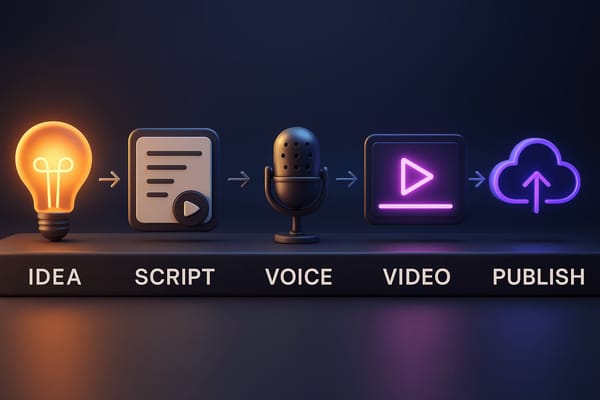
No tool automatically makes a high-converting ad. The real advantage is speed: how quickly you can move from angle to script to video to testing.
What Is an AI UGC Video Generator?
An AI UGC video generator is software that creates videos designed to look and feel like user-generated content. Instead of hiring a creator to record a testimonial, product demo, reaction, or founder-style video, you provide the product, angle, or script and the tool generates the video using AI presenters, avatars, voiceovers, captions, b-roll, templates, or generated visuals.
HeyGen describes its UGC generator as a way to create UGC-style video ads from text, with presenter delivery, visuals, captions, transitions, and exports for platforms like TikTok, Instagram, Facebook, and YouTube. InVideo positions its UGC ads workflow around avatar-led UGC-style ads.
That is the category. The strategy is bigger: using AI to create enough creative variation to find what buyers respond to.
For a D2C brand, that might mean testing five product benefits across three hooks. For a SaaS company, it might mean turning one feature into founder POV, customer pain, comparison, and demo-style videos. For an agency, it might mean producing first-pass ads before booking creators for the winning concepts.
When AI UGC Videos Are Worth Using
AI UGC is useful when speed and volume matter more than one perfect creator asset.
It is especially useful for:
- Ecommerce product demos where the core product story is clear.
- App and SaaS ads that need fast hook testing.
- Retargeting ads where the viewer already knows the brand.
- Founder-style explainers when the team does not want to record daily.
- Agency creative testing before committing budget to creator shoots.
- Localized or persona-specific ad variants.
It is less useful when the ad depends on deep personal trust, a real customer story, medical or financial credibility, or a creator whose real audience relationship is the reason the ad works.
The practical rule: use AI UGC to test angles quickly, then use real creators for the angles that prove they deserve more production investment.
How to Choose the Right AI UGC Video Generator
Most tools look impressive in demos. The real test is whether they help you create better ad variations faster.
1. Avatar and Presenter Quality
If the tool uses AI presenters, check more than realism. Look at expression, pacing, gestures, eye contact, lip sync, and how naturally the presenter handles your script.
A realistic avatar with a stiff script still feels fake. A slightly less polished presenter with a sharp hook and believable delivery can perform better.
2. Script Control
Good UGC ads start with the script, not the avatar. You need control over the hook, product promise, objection handling, proof, and CTA.
Look for tools that let you rewrite quickly, generate variants, and keep your brand claims accurate. If the script workflow is shallow, you will spend the saved production time fixing weak messaging.
3. Short-Form Editing
UGC-style ads are not just talking heads. They often need captions, b-roll, product shots, pattern interrupts, visual proof, and quick cuts.
This is where a broader AI short-form video workflow can beat an avatar-only workflow. A finished ad needs rhythm, not just a person reading lines.
4. Platform Fit
TikTok, Instagram Reels, Facebook, and YouTube Shorts all reward vertical, fast, clear creative. TikTok's own ads best practices hub groups creative, optimization, measurement, and product/video quality as core areas for advertisers. Google frames effective video ads around Attention, Branding, Connection, and Direction.
Your AI UGC tool should make it easy to export vertical videos, keep captions readable, and create multiple hooks for platform testing.
5. Variation Speed
The point of AI UGC is not one ad. It is fast variation.
Ask:
- Can I create five hooks from one product angle?
- Can I test multiple presenters or voice styles?
- Can I edit the script without rebuilding the whole video?
- Can I make platform-specific cuts?
- Can I keep a clean testing log?
If a tool saves time on generation but slows down iteration, it will not help your creative system much.
The Best AI UGC Video Generators in 2026
1. Clipwise: Best for Short-Form Ad Variations and Product-Led Videos
Clipwise is a strong fit when you want more than a single avatar-led UGC clip. It is designed around short-form video creation, including scripts, visuals, voiceover, captions, and iterative editing.
That makes it useful for teams that need ad variations for Reels, Shorts, TikTok-style videos, product explainers, and UGC-inspired creative. Instead of thinking only in terms of "pick an avatar and paste a script," Clipwise is better positioned as a practical workflow for turning a product angle into a complete short-form video draft.
Use Clipwise when:
- You need multiple short-form ad concepts.
- You want to test hooks and scripts quickly.
- You want videos for both paid and organic channels.
- You care about captions, pacing, and visual structure.
- You want a chat-based way to refine drafts.
Best-fit use cases:
- Ecommerce product demos.
- App explainers.
- Founder-style ads.
- UGC-inspired retargeting videos.
- Reels, Shorts, and TikTok-style product content.
Try it here: Clipwise AI video generator or use Clipwise Video GPT for chat-based video creation.
2. HeyGen: Best for Avatar-Led UGC Ads
HeyGen is one of the better-known AI avatar platforms. Its UGC generator page focuses on creating UGC-style video ads from text, with creator-style presenters, captions, transitions, and exports for major social and ad platforms.
Use HeyGen when:
- You want presenter-led or avatar-led ads.
- You need many creator-style presenter options.
- You already have strong scripts.
- You want testimonial-style or spokesperson-style video.
The main watchout is that avatar quality alone does not make the ad work. You still need a believable script, specific product angle, and enough editing to avoid the "AI person reading a generic pitch" problem.
3. Creatify: Best for Ecommerce Product-to-Ad Workflows
Creatify is built around AI video ads and ecommerce creative workflows. Its TikTok App Center listing describes creating UGC-style TikTok ads with AI, including avatars and product-link or description-based generation.
That makes it especially relevant for ecommerce teams that want to turn product pages into ad concepts quickly.
Use Creatify when:
- You sell physical products.
- You want product-link-to-ad workflows.
- You need many ecommerce creative variants.
- You care about creative performance reporting and iteration.
The watchout is quality control. Product-link automation is useful, but you still need to review claims, visuals, pacing, and whether the final video feels native enough for paid social.
4. Arcads: Best for AI Actor UGC Ads
Arcads is commonly positioned around AI actors and realistic ad videos. A third-party Arcads listing describes it as a UGC video ad creator built around realistic, lip-synced AI actors.
Arcads is a good fit for performance teams that specifically want actor-led AI UGC ads and are comfortable testing many variations.
Use Arcads when:
- You want AI actor-led ads.
- You need lots of A/B creative variants.
- You are focused on paid social creative.
- You have a clear script and offer.
The watchout is format breadth. If your creative strategy needs product shots, faceless story videos, animated explainers, and Shorts-style edits, you may need a wider video workflow alongside actor generation.
5. InVideo: Best for Guided UGC Ad Workflows
InVideo's help center explains a UGC ad workflow that uses AI-generated avatars to create UGC-style ads without a camera. The workflow is guided, which can help beginners get from idea to video without needing a complex production process.
Use InVideo when:
- You want a guided workflow.
- You are new to AI video creation.
- You need template-style support.
- You want to create UGC-style ads without building a custom process.
The watchout is depth. A guided workflow is helpful, but advanced marketers may still want more control over testing structure, creative strategy, and platform-specific iteration.
6. Manual UGC Creators: Best for Authenticity and Proof
AI tools do not eliminate real creators. They change when you need them.
Manual UGC creators are still the best choice when:
- You need real product use.
- The creator's personality is the selling point.
- The ad needs genuine customer proof.
- You are filming sensitive claims.
- You already know the angle works and want a higher-trust version.
A good workflow is to use AI UGC generators for concept testing, then commission real creators for the winners.
A Simple AI UGC Ad Workflow
Use this workflow before you open any tool.
Step 1: Pick One Product Angle
Do not start with "make a video about our product." Start with one specific angle.
Examples:
- "This saves founders two hours per video."
- "This creates a product demo without filming."
- "This helps agencies test five ad hooks in one afternoon."
- "This turns one product photo into a short-form ad concept."
The narrower the angle, the easier the video is to make.
Step 2: Write 5 Hooks
UGC ads live or die in the first few seconds.
Try these hook types:
- Problem: "Still paying for UGC before you know which angle works?"
- Contrarian: "Your UGC ad does not need a perfect creator. It needs a better hook."
- Demo: "Here is how I turned one product idea into three ad videos."
- Speed: "I made this product ad without filming anything."
- Objection: "AI UGC looks fake when the script sounds fake."
Step 3: Build a 30-Second Script
Use this structure:
- Hook.
- Problem.
- Product moment.
- Benefit.
- Proof or reason to believe.
- CTA.
Example:
"Need more UGC ad variations but tired of booking new shoots every week? Start with your product angle, generate a script, create a short-form video draft, and test the hook before you spend on production. Clipwise helps you turn ideas into short videos with scripts, visuals, voiceover, and captions. Try Clipwise and create your next short video today."
Step 4: Generate 3 Video Variants
Do not judge the whole tool from one output. Generate at least three variants:
- One creator-style talking video.
- One product-demo version.
- One faceless or voiceover-led version.
This tells you whether the tool is flexible enough for your real workflow.
Step 5: Add Captions and Visual Proof
Captions are not decoration. They carry the message when viewers watch without full attention.
Add:
- Clear first-frame text.
- Product benefit captions.
- Short phrases, not paragraph captions.
- On-screen CTA.
- Visual proof of the product or result.
Step 6: Test Hooks, Not Just Tools
Your first question should not be "Which AI UGC video generator is best?" It should be "Which angle gets people to stop and care?"
Use the same tool to test:
- 5 hooks.
- 3 product angles.
- 2 CTAs.
- 2 formats.
That gives you 60 possible variations before you even consider a creator shoot.
Common Mistakes With AI UGC Ads
Mistake 1: Making the Video Too Polished
UGC-style content should feel natural. If the video looks like a corporate explainer pretending to be casual, viewers notice.
Keep the language simple. Use direct claims. Add real product moments.
Mistake 2: Using Generic Scripts
"This amazing tool will transform your business" is not a UGC hook. It is filler.
Better:
"I needed five ad variations for one product launch, so I tested the hooks with AI before booking creators."
Specific beats polished.
Mistake 3: Skipping the Product Moment
Many AI UGC ads show a presenter talking, but never show the product clearly. The viewer needs to understand what is being sold.
Add screen recordings, product shots, generated product scenes, app walkthroughs, or a simple before/after.
Mistake 4: Testing One Video
One AI-generated ad tells you almost nothing. Test angles, hooks, presenters, captions, and CTAs.
AI's advantage is variation. Use it.
Mistake 5: Publishing Without Reviewing Claims
AI can make claims sound confident. That does not mean they are approved, accurate, or compliant.
Review every claim before running paid ads, especially around health, finance, income, legal, safety, or platform-specific guarantees.
The Practical Recommendation
If you want avatar-led UGC, compare HeyGen, Arcads, Creatify, and InVideo.
If you want a broader short-form video workflow that can support UGC-style ads, Reels, Shorts, product videos, voiceover-led content, and quick iterations, start with Clipwise.
The highest-converting setup is usually not one tool. It is a creative system:
- Use AI to generate many first-pass angles.
- Test hooks and formats quickly.
- Put budget behind the winners.
- Use real creators where authenticity matters most.
- Keep producing new variants before performance drops.
That is where an AI UGC video generator becomes more than a novelty. It becomes part of your creative engine.
Create your next short video with Clipwise and start testing UGC-style ad ideas faster.
FAQ
What is the best AI UGC video generator?
The best AI UGC video generator depends on your workflow. Clipwise is a strong choice for short-form ad variations and product-led videos. HeyGen is strong for avatar-led presenter videos. Creatify is useful for ecommerce product-to-ad workflows. Arcads is focused on AI actor UGC ads. InVideo is helpful for guided UGC ad creation.
Can AI UGC videos replace real creators?
AI UGC videos can replace some early concept testing and low-stakes creative production, but they should not fully replace real creators when authenticity, trust, or real product experience matters. A smart workflow uses AI to test angles, then uses real creators for proven concepts.
Do AI UGC ads convert?
They can, but conversion depends on the script, hook, offer, product, audience, and testing plan. The AI tool helps you create variations faster. It does not automatically fix weak positioning or a poor offer.
What should I put in an AI UGC script?
Use a simple structure: hook, problem, product moment, benefit, proof, and CTA. Keep sentences short. Make the product clear. Avoid generic claims like "boost your business" unless you explain exactly how.
How long should an AI UGC ad be?
For short-form paid social, start with 15 to 35 seconds. Test shorter and longer versions once you know which hook and angle work. The right length depends on the platform, audience, and offer complexity.
Is AI UGC good for ecommerce?
Yes, ecommerce is one of the strongest use cases. AI UGC can help brands test product demos, benefit-led ads, offer ads, unboxing-style concepts, and retargeting videos before spending on creator shoots.